



BeatBlocks iOS

Build beats with blocks!
BeatBlocks is a fun music-making app for iPhone and iPad that lets you build music in the real world using LEGO and other construction bricks.
How does it work?
BeatBlocks uses the camera on your iPhone or iPad with advanced AI to detect Lego bricks of different type and colour. To build a beat, just lay out a pattern of bricks in front of the camera.
Brick detection using AI
Bricks = Beats
The app uses a repeating 8-beat loop to build beats. Each loop plays from left to right, and when the app sees a brick, it plays a sound: so as you build, you make music.


Experiment with patterns and bricks
The app is a creative sandbox for play and discovery, making it super easy to explore beats, bass-lines and melodies just by playing with real-life lego bricks. To change your loop, just move or scatter the blocks around, try out different colours, and wait for the loop to update.
Colours = Sounds
Three types of instrument are available: drums, melody and bass. Use different colours of bricks to make music with the different instrument types.

-
To build your drum beat, use red bricks for kick, yellow for snare, green for hi-hat, and pink or grey for percussion The left-to-right position sets the timing of each beat. Use the vertical position to add accents on hi-hat and percussion.
-
Use blue bricks to build your lead melody. The left-to-right position sets the timing of each musical note, the length sets the duration, and the top to bottom position selects which note/pitch to play. Low notes at the bottom, higher notes at the top.
-
Use orange bricks to build your bassline. The left-to-right position sets the timing of each note, the length sets the duration, and the top to bottom position selects which note to play. Low notes at the bottom, higher notes at the top.

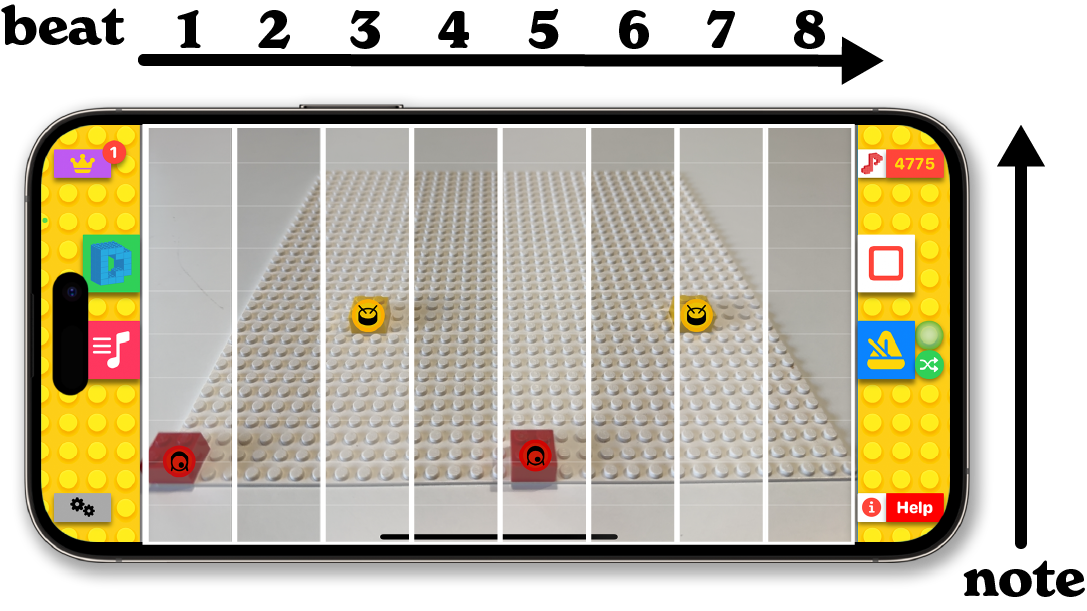
Grid-based music making
The left-to-right position sets the timing of each musical note, the top to bottom position selects which note/pitch to play, and the colour sets the instrument. The app also lets you adjust the tempo, swing, musical key and scale for your loops.

Sound Packs
Choose from a range of musical styles and start building, recording and sharing your beats.


BeatBlocks rewards you with in-game credits for every loop you build. With bonuses for hitting activity milestones, the more you loop; the more credits you earn.
Use credits to unlock new musical styles, drum, bass and instrument sounds. To super-charge your sound library, extra credits and loop multipliers are also available as in-app purchases.
Rewards and upgrades
Testimonials
-
![Black and white portrait of a smiling man with glasses and a beard.]()
“They loved it. I showed them how to frame the board in the camera, where the play button was, and they were away.”
Tim Hellas, Parent of 5 year old
-
![Promotional graphic featuring "Craig Smith" from "Positive Partnerships." Includes a black and white photo of a smiling man, yellow background with decorative elements like stars, hearts, and a megaphone shouting "Boom."]()
"You have to give BeatBlocks a try: the first time you play with it, it feels like something you would have daydreamed about as a kid"
Craig Smith, Apple Distinguished Educator


FAQs
-
To get started all you need are some bricks (preferably 2×2 or 2×4, in primary/secondary colours) , and your iPhone or iPad (with the Beatblocks app installed). If you want to get fancy, build yourself a nice stand to make sure the camera stays steady, and grab a lego baseplate (white or grey are preferable).
-
BeatBlocks uses the camera on your iPhone or iPad to detect blocks of different type and colour. When the app sees a brick, it will play a sound: so as you build, you make music.
-
No you don’t. Base plates are great for helping to line your bricks up, but the app will work with a variety of background surfaces and textures - wooden desks, floors, fabric mats, carpets, paper, etc.
Bear in mind that if the contrast between your background and the lego bricks is low, or if the colour are too similar then brick detection might not be as accurate.
If you are using a baseplate, a white or grey one is preferable, to maximise contrast, and to minimise colour similarity in the background.
-
Beatblocks has been trained to recognise traditional 2x2 and 2×4 Lego-style construction bricks.
For drum sounds you need
red (kick)
yellow (snare)
green (hi-hat)
pink or grey (percussion).
For bass you’ll need orange bricks, and for lead/melody you’ll need blue.
-
To get started, grab a handful of 2×2 or 2×4 lego bricks, and lay them out on a well lit flat surface. Use a phone stand, either purpose made or built from Lego bricks and point your camera towards the area where you intend to lay out your bricks.
To make music, simply lay a few bricks in front of the camera. Press the play button in the app - a repeating 8-beat loop will play and on every loop, when the app sees a brick, it will play a sound.
-
We recommend using a stand for most situations, especially when starting out. A purpose made stand, or even better, a custom stand built from bricks, will increase camera stability and should improve brick detection.
Holding the phone in-hand works too, but remember that any movement will affect detection. WIth a bit of practice it can actually be a lot of fun, and a pretty neat performance trick (!) to try moving your camera around while focused on your bricks. Try getting closer/further away, or rotating your camera through various angles, to see how it affects your beat.
-
Using BeatBlocks with your phone in-hand can be a lot of fun, and with a bit of practice you can pick up some pretty neat performance tricks : try moving your camera left/right closer/farther, or rotating it through 90 or 180 degrees for some interesting effects.
-
To make a simple beat, grab some red and yellow bricks - 2 of each, and 4 green bricks.
Place the red bricks in a row near the bottom of the camera view, one as close to the left edge as possible (so that it sits in the beat 1 position), and the second just to the right of the centre of the screen (at beat position 5).
Press play. You should hear a kick drum playing with regular spacing between each beat of the drum. Adjust as necessary.
Next, add the snare drum. On a row slightly higher up, place one yellow brick roughly a quarter of the way from the left edge of the screen, and another about three-quarters of the way from the left edge of the screen.
You should now hear a regular kick-snare-kick-snare beat.
To finish, add the 4 green bricks to another row, slightly higher up the screen, placed so that they are in the middle of the gaps between the red and yellow bricks.
Tada! Try adding more bricks, moving them around an adding some grey or pink bricks to add some extra percussion sounds.
-
Yes, there are 2 ways to do this:
Change to a different soundpack
For hi-hat (green) and percussion sounds (pink/grey), placing the brick in the bottom half of the screen will play a different sound compared to placing it in the top half of the screen.
-
Yes! For the melody and bass instruments, the notes go from low at the bottom of screen to high at the top. Don't worry about knowing your C from your F#: the app uses tuned sound packs so all your bricks will work together and you can concentrate on building the music. Of course, if you do want to change the tuning, you can adjust that in the app too.
-
You can make chords using bass and melodic instruments. To make a chord, place two or more of the same coloured brick in the same vertical column (as viewed on the screen - there are vertical beat indicators to help you line the bricks up).
-
As a general rule, the app can only play what the camera can see.
If you place one brick on top of another, or if you otherwise hide or obscure a brick, the app will play what it sees - the topmost brick.
-
Yes! While the AI is very clever and has been trained to recognise Lego bricks, it is not too clever, so if it sees something that it thinks is a lego brick, you can probably use it to make beats!
We’ve seen it working with Skittles, Smarties, fruit/berries, coloured wooden blocks, etc, etc. These things won’t work quite as well as true Lego, but it has to be said that there is still a lot of fun to be had in making music with sweets! Plus you get to eat them afterwards…
Of course, it’ll work with generic/unbranded construction bricks too.
-
In-game credits are used to unlock new soundpacks and instrument sounds in the “Band Box” area of the app.
Credits are awarded for every loop you build, so the more you play, the more credits you can build up. You can purchase loop multipliers to increase the number of credits awarded for each loop.
Bonus credits are awarded for hitting a range of activity milestones and can be claimed in the achievements area of the app. You can tell when a new bonus is available to claim: a notification dot will appear over the “achievements” button.
-
Yes! There’s a small red button next to the main play button - use this to make a screen recording of your performance. When you press the record button, you’ll get a short countdown to give you a little time to get ready. When you are finished, just press stop and you’ll be given a chance to review and share your big performance!
-
No, not in this version of BeatBlocks, but yes, yes you can if you get the fully-loaded BeatBlocks Studio app instead. In BeatBlocks studio, you can use MIDI to send your beats to GarageBand, Logic, and other MIDI enabled apps.
-
No, not with this version of BeatBlocks, but if you get the fully-loaded BeatBlocks Studio app instead, then yes. In BeatBlocks Studio you can use Ableton Link to synchronise beats, tempo and playback across multiple instances of BeatBlocks Studio running on separate iPads/iPhones for amazing group performances, or you can use it to sync with other Ableton Link enabled software/hardware.