
Two apps for iPhone & iPad
BeatBlocks
Lay out LEGO® and other construction bricks in front of your camera and they become music. Start free with BeatBlocks, or go fully loaded with BeatBlocks Studio.

BeatBlocks
Free to playThe place to start. Build beats, earn credits as you play, and unlock new styles and sounds along the way, or unlock them with an in-app purchase.
For families, first-timers and classrooms getting going.
Get BeatBlocksBeatBlocks Studio
Fully loadedEvery sound and style unlocked, plus multi-channel MIDI and Ableton Link for playing with the rest of your setup.
For budding musicians, educators and advanced users.
Get StudioHow does it work?
Both apps share the same engine. The camera on your iPhone or iPad uses advanced AI to detect bricks of different type and colour. Lay out a pattern in front of it and you have built a beat.
- One
Point your camera at the board
A stand helps, even one built from bricks.
- Two
Lay out a pattern of bricks
2×2 or 2×4, in primary and secondary colours.
- Three
Press play and start building
Move the bricks and the loop updates.
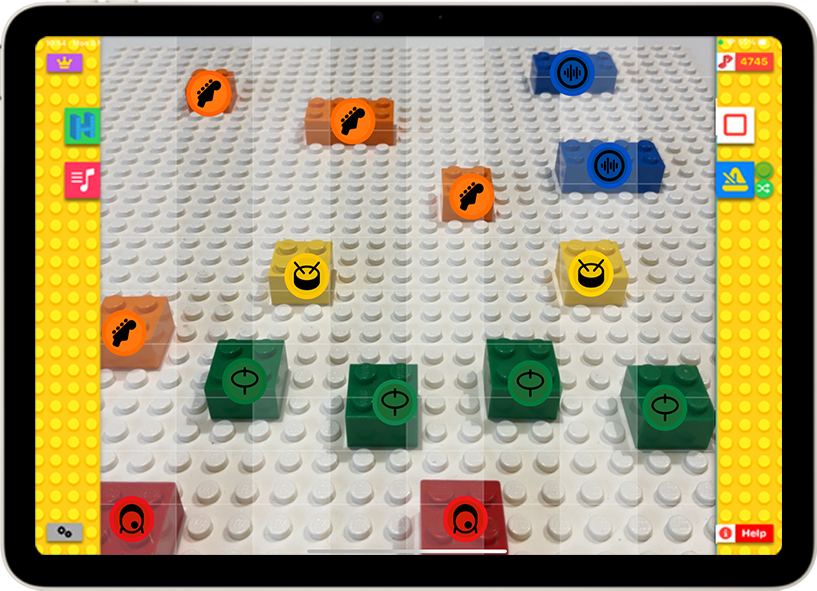
Bricks = beats
A repeating 8-beat loop, played left to right
When the app sees a brick, it plays a sound, so as you build, you make music.

Pick Drums or Melody, drag bricks from the tray into the grid, then press play. In Melody, a brick’s height sets its pitch.
Colours = sounds
Three instruments, one handful of bricks
Drums, melody and bass. Use different colours of brick to play the different instrument types, the same key in both apps.
Drums
- Kick
- Snare
- Hi-hat
- Percussion
Left to right sets the timing of each beat. Use the vertical position to add accents on hi-hat and percussion.
Melody
- Blue bricks build your lead line
Left to right sets the timing of each note, the length sets the duration, and top to bottom selects the pitch. Low notes at the bottom, higher notes at the top. Stack two or more of the same colour in a column to make a chord.
Bass
- Orange bricks build your bassline
Same rules as melody: position sets timing and pitch, length sets duration. Everything stays in tune, because both apps use tuned sound packs. Adjust tempo, swing, key and scale whenever you like.
Which app is for you?
Same bricks, same camera, same 8-beat loop. Studio adds the pro-level features: everything unlocked from the start, plus MIDI and Ableton Link.
| Feature | BeatBlocksFree to play | StudioFully loaded |
|---|---|---|
| PriceOn the App Store | Free, with in-app purchases | £9.99, one-off |
| Brick detection with AICamera-based, on device | Included | Included |
| 8-beat loop sequencerDrums, bass and melody | Included | Included |
| Tempo, swing, key and scaleTuned sound packs | Included | Included |
| Chords and arpeggiosStack bricks in a column | Included | Included |
| Screen recording and sharingCountdown, review, share | Included | Included |
| Sound packsSynthwave, hip-hop, funk and more | Unlock with credits | All included |
| Instrument soundsDrum, bass and lead kits | Unlock with credits | All unlocked |
| In-game credits and multipliersEarned for every loop you build | Yes | Not needed |
| Multi-channel MIDI outputA channel per instrument part | Not in this version | Included |
| Works with GarageBand and Logic ProPerform live or record | Not in this version | Included |
| Ableton LinkSync tempo across devices and apps | Not in this version | Included |
| Lesson Plan GeneratorFree curriculum-aligned plans | Studio only | Included |
| Best for | Families and first beats | Musicians and educators |
| Both are on the App Store | Get BeatBlocks | Get Studio |
BeatBlocks is free to play, with in-app purchases that unlock sound packs and instruments. Studio is a one-off £9.99 purchase with everything unlocked and no in-app purchases.
Studio only
Works with the rest of your music apps
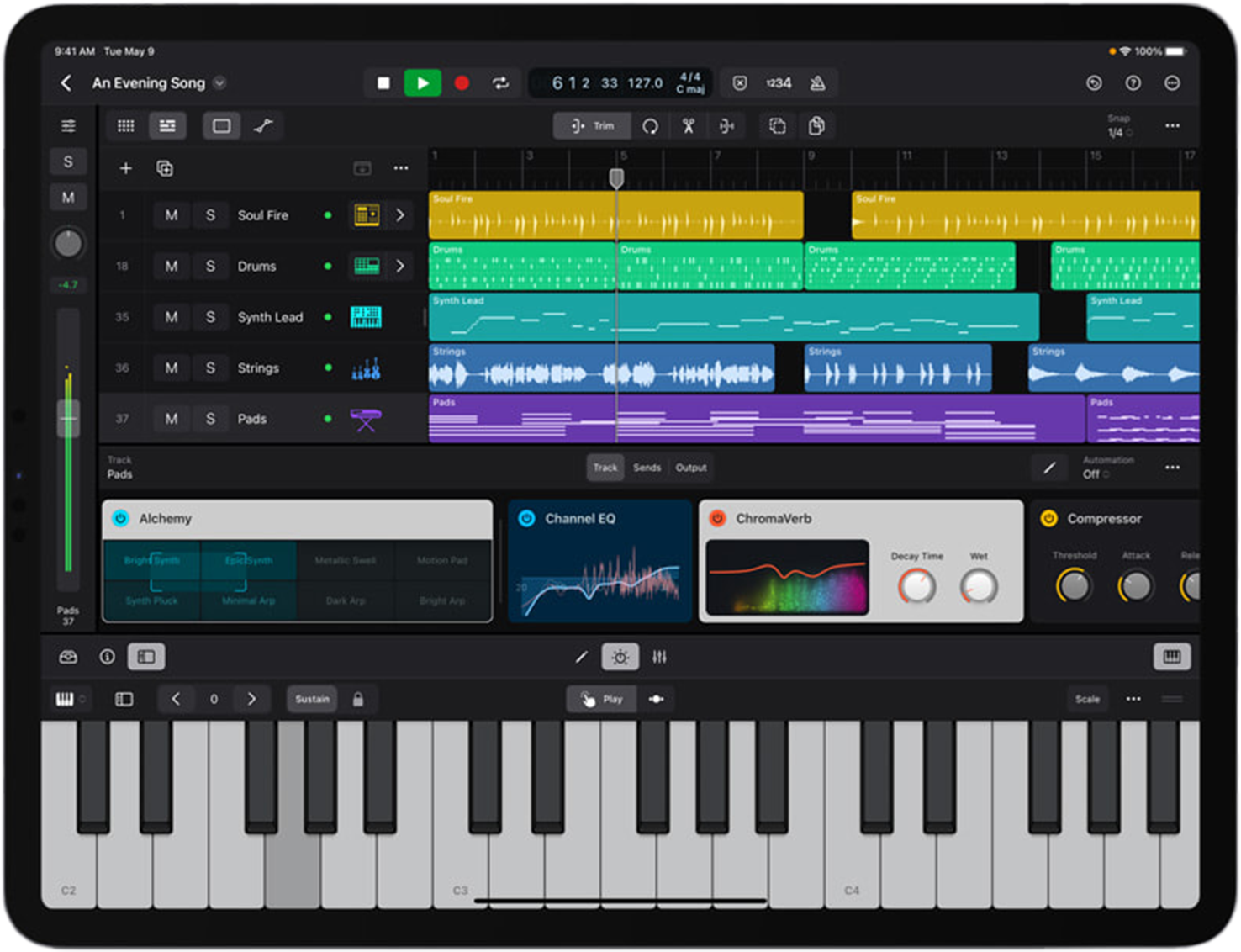
Multi-channel MIDI output sends your drum, bass and lead parts to different instruments in Logic Pro, GarageBand or any other MIDI-enabled app, for live performance or recording. Ableton Link keeps beats, tempo and transport in sync across several devices running Studio.


In BeatBlocks
Earn as you play
BeatBlocks rewards you with in-game credits for every loop you build, with bonuses for hitting activity milestones. Spend them in the Band Box on new musical styles and new drum, bass and instrument sounds. Extra credits and loop multipliers are available as in-app purchases.
In Studio
Everything unlocked
Studio does not use credits. Every sound pack and instrument is unlocked from the moment you open it: synthwave, hip-hop, funk and more. Record a performance to screen, or capture it straight into GarageBand or Logic Pro over MIDI.
For teachers · free
Lesson Plan Generator
A free tool that writes curriculum-aligned lesson plans and activities built around BeatBlocks Studio: composition, performance or music tech, for the age range you teach. Pick a curriculum, a learning focus and a theme, and download the plan as a PDF.
Open the generatorWhat people say
The most forward thinking music app I know of. It is a mature compositional program in its own right, something musicians of all levels can enjoy and create with.
 Craig Smith · Apple Distinguished Educator
 The schools I work with have absolutely loved it. Once they see the LEGO blocks making music they are fascinated.
 Andy Haines · Billy & Andy’s Music School
 A valuable composition resource and a great tool for exploring pitch, rhythm and timbre without investing in any additional resources.
 Gawain Hewitt · Music Teacher Magazine
 A great resource to assist with the inclusion of all young people wanting to participate in music, and to remove barriers to experiment with their creativity.
 Kerry McKinlay · Music (PGDE) Teaching Fellow
 They loved it. I showed them how to frame the board in the camera, where the play button was, and they were away.
 Tim Hellas · Parent of a 5 year old
 I use it with GarageBand. I can say it is very fun and creative.
 Michele Russano · Music Teacher, Disability Specialist
 Questions
What do I need?
Some bricks (2×2 or 2×4 work best, in primary or secondary colours) and your iPhone or iPad with the app installed. A phone stand helps, and you can even build one from bricks.
Do I need a LEGO baseplate?
No. Baseplates help you line bricks up, but the app works on all sorts of surfaces: desks, floors, fabric mats, paper. A white or grey baseplate gives the best contrast if you do use one.
What type of bricks does it work with?
Traditional 2×2 and 2×4 LEGO-style bricks. Red is kick, yellow snare, green hi-hat, pink or grey percussion, blue melody and orange bass. Generic construction bricks work too.
How do I play?
Lay a few bricks in front of the camera on a well-lit surface and press play. A repeating 8-beat loop runs, and each time the app sees a brick it plays a sound. Move the bricks and the loop changes.
Does it work with anything other than LEGO bricks?
Yes. It is trained on LEGO-style bricks, but we have seen it work with Skittles, Smarties, fruit and coloured wooden blocks. They do not work quite as well, but there is a lot of fun to be had (and you can eat the sweets afterwards).
Is there an Android or web version?
Not yet. BeatBlocks is on iPhone and iPad only for now, and there is no Android, web or browser version. If you would like one, tell us: we log every request and can let you know if we build it.
Do I need in-game credits?
BeatBlocksIn BeatBlocks you earn credits for every loop and spend them in the Band Box to unlock new sound packs and instruments. Loop multipliers and extra credits are in-app purchases.
StudioNo. BeatBlocks Studio does not use credits. Every sound pack and instrument is unlocked and ready to use from the start.
Can I record my performance?
BeatBlocksYes. A small red button next to play makes a screen recording, with a countdown so you can get ready.
StudioYes, to screen, or record straight into GarageBand or Logic Pro over MIDI.
Can I use MIDI to connect to GarageBand?
BeatBlocksNot in BeatBlocks. Get BeatBlocks Studio for multi-channel MIDI to GarageBand, Logic Pro and other MIDI apps.
StudioYes. Multi-channel MIDI sends your drum, bass and lead parts to different instruments in GarageBand, Logic Pro or any MIDI app.
Does it work with Ableton Link?
BeatBlocksNot in BeatBlocks. BeatBlocks Studio has Ableton Link.
StudioYes. Ableton Link syncs tempo and playback across several iPads and iPhones, or with any Link-enabled software.

Seen it somewhere bigger?
Played it at a museum?
That is BeatBlocks Live, the big multi-player installation, at LEGOLAND® Discovery Centres, the Science Museum, the National Museum of Scotland and V&A Dundee. Over 200,000 people have played it.
See the installationsGrab some bricks and get building.
Both apps are on the App Store for iPhone and iPad.